Now Firefox can select which sites use its VPN, and clear your browsing history with one click
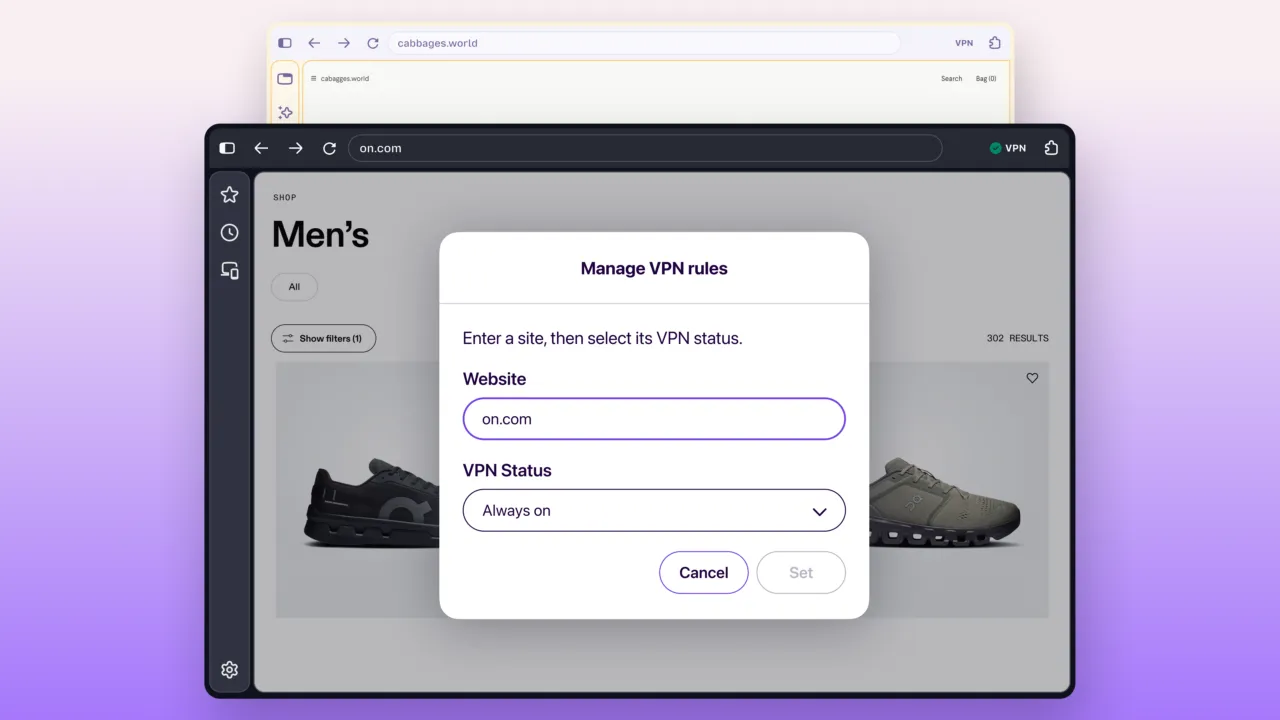
Mozilla released Firefox 161 on Tuesday with a new setting you can use to choose which pages automatically open with the browser's VPN active. Using the "Manage VPN rules" option in Firefox's VPN panel, you can set it to "always on" or "always off" for specific sites, so you don't have to toggle it...
Content & Media Rights
Stevie Bonifield / The Verge — Technology
Editorial Publisher
360 NEWS (Independent Media)
GOOGLE ADVERTISEMENT
360 News
Photo / Source: Stevie Bonifield / The Verge — Technology
Mozilla released Firefox 161 on Tuesday with a new setting you can use to choose which pages automatically open with the browser's VPN active. Using the "Manage VPN rules" option in Firefox's VPN panel, you can set it to "always on" or "always off" for specific sites, so you don't have to toggle it manually every time you visit certain pages.
Starting Tuesday, Mozilla is also rolling out a "Fire" button in standard Firefox windows that lets you quickly clear your browsing data directly from the toolbar. You can choose which data it deletes, including browsing history, downloads history, cookie data, site data, temporary files, saved form in …
"Proponents and sector analysts emphasize that this development strengthens institutional transparency, addresses long-standing public priorities, and establishes a foundation for durable systemic progress."
The Verge — Technology(Primary Reporting & Verified Documentation, The Verge — Technology)
2026-11-24
"According to documented reports from The Verge — Technology: Mozilla released Firefox 161 on Tuesday with a new setting you can use to choose which pages automatically open with the browser's VPN active. Using the "Manage VPN rules" option in Firefox's VPN panel, you can set it to "always on" or "always off" for specific sites, so you don'.... Documented context, event timelines, and core factual evidence remain on public record."
What is your view on “Now Firefox can select which sites use its VPN, and clear your browsing history with one click”?
📊
Poll Not Available
No voluntary reader opinion poll is currently linked to this specific article.
Editorial & Syndication Notice: This story has been syndicated or published by 360 NEWS in accordance with verified fair-use, official press dissemination, and original attribution protocols. All trademarks, photos, and referenced quotes remain the property of their respective owners. For editorial corrections, press inquiries, or rights notices, contact [email protected].








Comment
0Upholding journalistic discourse. No registration required.
No comments yet. Share your perspective!